
Cybersecurity & Resilience
How do smart visitor management systems work?
How smart visitor management works from invitation to exit, and how to handle data, temporary access and failures.
Design digital services around people's journeys, and never make an app the only way in.
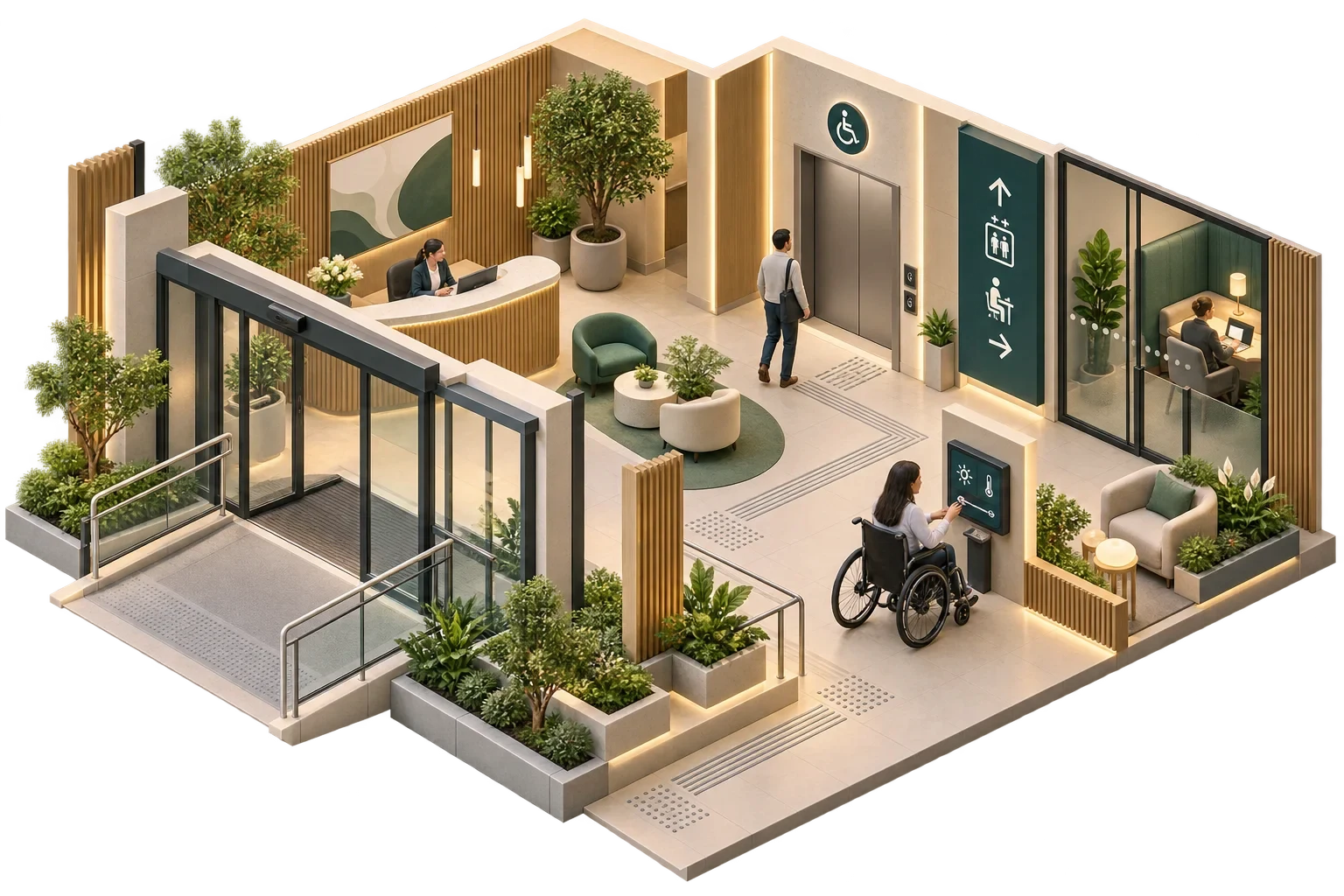
Technology can make a building easier to arrive at, to find your way around, to use and to ask for help in. It does so only when it is designed around people with different abilities and needs, and when it supplements good physical design and helpful staff without replacing them. A familiar failure is a service that works beautifully for a confident smartphone user and makes things harder for everyone else. The safeguards are simple to state: design from real journeys, test with representative users, and keep a practical non-digital route for every essential task.
Accessibility means that people with disabilities, whether mobility, sight, hearing, cognitive, neurological or speech-related, can use the building and its services. Occupant experience is broader: how easy, comfortable and predictable the building is for everyone. Designing well for accessibility usually improves the experience for all. Clear signage, predictable controls and simple interfaces help a first-time visitor as much as a regular user with a visual impairment.
The physical accessibility of the building is governed by the building regulations and standards of the jurisdiction, and is the responsibility of the architect and appointed access specialists. Digital services are an additional layer that has to work with that physical design; they cannot make up for its gaps.
| Journey stage | Possible smart service | Design condition |
|---|---|---|
| Before arrival | Accessible web information on entrances, parking, lifts, toilets | Content meets recognised web accessibility guidance |
| Arrival and entry | Automatic doors, step-free routes, accessible intercoms, visitor pre-registration | Alternatives for people who cannot use a phone or touchscreen |
| Wayfinding | Digital signage, app-based directions, audible or tactile cues | Physical signage remains complete without the app |
| Using spaces | Room controls for lighting, temperature, blinds; hearing-assistance systems | Controls identifiable, reachable and understandable |
| Asking for help | Accessible help points, messaging, staff alerts | A human response route at all times |
| Emergencies | Visual and audible alarms; refuge communication | Designed and certified under fire and life-safety rules, not by the smart platform |
For websites, apps, touchscreen kiosks and room-control panels, the Web Content Accessibility Guidelines (WCAG) from the W3C are the established technical basis. WCAG 2.2, published in October 2023 and updated in December 2024, is organised around four principles (perceivable, operable, understandable and robust) with testable success criteria at levels A, AA and AAA. It is the version the W3C encourages organisations to use, and it has also been adopted as an international standard, ISO/IEC 40500:2025. The W3C publishes guidance, known as WCAG2ICT, on applying WCAG to non-web software and devices.
In the EU, the European Accessibility Act (Directive (EU) 2019/882) has set accessibility requirements since 28 June 2025 for certain products and services, including self-service terminals such as ticketing and check-in machines, and e-commerce. It is commonly met through WCAG and the European standard EN 301 549, whose 2026 version uses WCAG 2.2. Whether it applies to a particular building service depends on what the service is and who provides it. That is a question for the project's accessibility specialist or legal adviser, and not one to assume either way.
WCAG covers digital content only. Door widths, ramps, lift dimensions and tactile paving are matters for the building's physical accessibility design.
Automation can help a great deal: lighting that comes on as someone enters, doors that open without force, temperatures that are comfortable without anyone touching a control. It can also frustrate people when it overrides a reasonable choice without explanation. The remedy is mostly a matter of giving control back. Put a manual control beside every automated function, one that can be found by touch as well as by sight, and make it confirm the request with a light, a sound or a change on screen. Keep automatic behaviour predictable and explain it: lights that switch off on someone sitting still teach people to distrust the whole building. Within safe limits, local adjustment remains possible.
A visitor with no app, a flat phone battery or little command of the local language must still be able to get in, find their destination and ask for help. Staff need a simple way to assist, such as a reception screen showing who is waiting at an accessible entrance, without weakening access control. And when the digital wayfinding service is down, physical signage and staff must be enough on their own.
Accessibility is best verified by observing people using the building, and the acceptance process should be built around that. It begins by defining the key journeys: arrival, entry, finding a room, using it, asking for help and leaving in an emergency. Those journeys are then tested with users representing different needs, ideally including people with lived experience of disability, and every point where someone hesitates, needs help or fails is recorded and fixed. Digital interfaces are checked against WCAG at the agreed level, using automated tools and manual review together, and the key tests are repeated after significant software updates.
Capture those occupant journeys before the technology brief is written, with the architect and access specialist in the room, whether the project is a new building or a refurbishment, and use them later as acceptance scenarios.
This article connects to our work on Building design.
We can discuss how this subject fits the project brief.
Contact Pagin Consulting