
Smart Buildings
How do you design an ICT network for a smart building?
How to design a smart building ICT network from the services it carries, including zones and operational ownership.
Start from a device-requirements schedule; most buildings need Wi-Fi, some LoRaWAN, few private 5G.
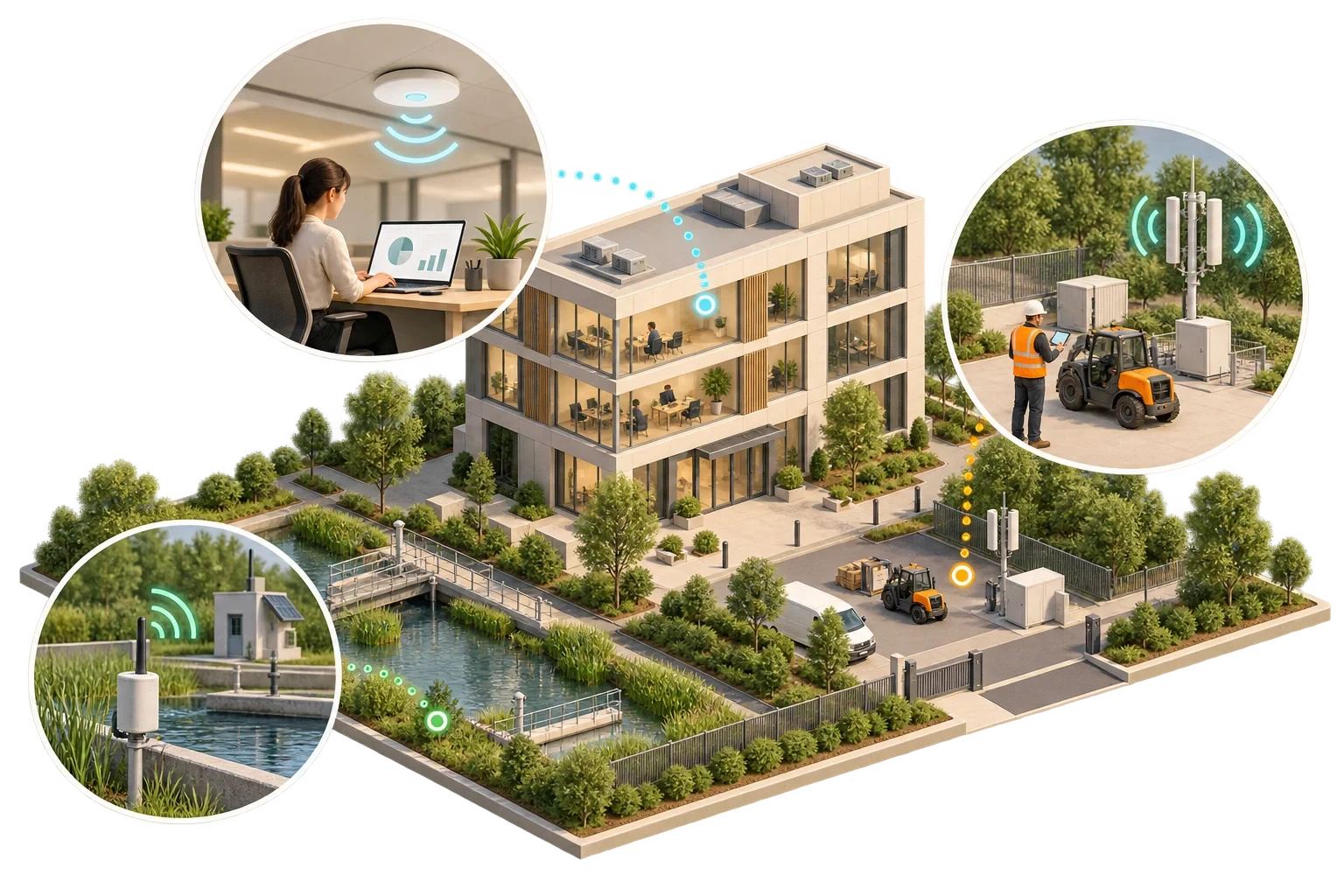
Nearly every building needs Wi-Fi. Some need LoRaWAN or a similar low-power network alongside it. Only a minority have a use case that justifies private 5G. The three are less competitors than tools for different jobs. Wi-Fi serves people and high-bandwidth devices. LoRaWAN serves battery-powered sensors that send small amounts of data occasionally over long distances. Private cellular serves specialised operational needs, typically mobility, very many devices across a large site or controlled performance, where the owner is prepared to take on the cost and responsibility of running a mobile network.
The right answer therefore comes from looking, device by device, at what must connect, not from a preference for one technology.
Scroll horizontally to read the full table.
| Wi-Fi | LoRaWAN | Private 5G / LTE | |
|---|---|---|---|
| Typical devices | Laptops, phones, displays, cameras, some building devices | Meters, environmental sensors, leak detectors, occupancy counters | Mobile robots, handheld terminals, connected vehicles, large sensor fleets |
| Data volume | High | Very low (small packets) | High or low, configurable |
| Battery life | Hours to days for most devices | Years on a small battery is a design aim | Varies widely by device |
| Spectrum | Licence-exempt | Licence-exempt sub-GHz bands (868 MHz in Europe) | Licensed or locally assigned spectrum |
| Who runs it | Building or tenant IT | Building owner, integrator or a public network operator | Owner, operator or specialist provider |
| Not suited to | Very low-power battery sensors at scale | Broadband, video or time-critical control | Simple sensor coverage on a modest budget |
The table is for orientation only. Product capabilities differ, and indoor performance depends heavily on construction materials and layout.
Wi-Fi is the obvious choice for occupants, guests and staff, and for building devices that need bandwidth, such as displays or some cameras. Each generation adds capacity and efficiency: the Wi-Fi Alliance describes Wi-Fi 7, introduced in 2024, as operating across the 2.4, 5 and 6 GHz bands, with features such as wider channels and multi-link operation. Access to 6 GHz is set nationally or regionally. In the EU, a Commission implementing decision, (EU) 2021/1067 as since amended, has required member states since December 2021 to make the lower part of the band, 5,945–6,425 MHz, available for Wi-Fi; it does not cover the frequencies above that, and rules outside the EU differ. Check what is permitted where the building is.
In a building, the design target is capacity and roaming, not just coverage. Signal everywhere on a heat map does not show whether a full conference room or a busy hotel restaurant will work. Guest, tenant, staff and building-device networks should be separated logically, and guest traffic must never reach building systems.
The LoRa Alliance describes LoRaWAN as a low-power, long-range network protocol operating in licence-exempt sub-GHz bands. It uses a star-of-stars topology in which gateways relay messages from end devices to a central network server over ordinary IP connections, and its design aim is that devices can run for years on a small battery.
That makes it well suited to sensors scattered through a building or campus: meters in plant rooms, temperature and humidity in stores, leak detection in risers, occupancy in meeting rooms. It is not a substitute for broadband or for time-critical control. Messages are small and infrequent, and the design has to assume that an individual reading will occasionally be lost.
The operating work is easy to underestimate. Devices need onboarding, batteries need replacing on a cycle, gateways need placing with reinforced walls and plant rooms in mind, and someone needs monitoring that shows when a sensor has gone silent.
A private cellular network gives an organisation its own mobile network on its own site. It can offer controlled performance, strong mobility across a large area and support for many devices, which is why it is used in logistics, manufacturing and some large campuses.
It also brings obligations that Wi-Fi and LoRaWAN do not. Spectrum access is national and varies. In Germany, for example, the Bundesnetzagentur assigns spectrum in the 3,700–3,800 MHz band for local use on a technology-neutral basis to applicants with a right to use the premises, such as an owner or leaseholder, with coordination requirements towards neighbouring networks; other countries have different arrangements. A private network also needs a core network, compatible devices with appropriate SIM or eSIM credentials, and someone qualified to operate it.
For most commercial offices and hotels, those obligations outweigh the benefit. The case strengthens where there is a demanding mobile or industrial use case that Wi-Fi demonstrably cannot meet.
The method is straightforward, and its value lies in the order. List the devices and what each needs: data volume, latency, mobility, power source, location and expected lifetime. Group them by what they need, whichever department owns them, and match each group to the simplest technology that meets its needs. Then count the full service cost, including gateways or access points, backhaul, licences or spectrum fees, subscriptions, device onboarding, battery replacement and ongoing operation. Finally, give each network a named owner, because a network without one will not be maintained.
Before committing to a design, survey and test with representative devices in the most difficult locations: basements, plant rooms and stairwells. Acceptance criteria should cover coverage, capacity, message delivery and recovery after a gateway or access point is lost.
A schedule of device requirements often settles the wireless argument on its own. Where it does not, compare the remaining options on what each would take to run for ten years; headline capability is the weaker test.
This article connects to our work on Our services.
We can discuss how this subject fits the project brief.
Contact Pagin Consulting